Does Web Design Affect SEO?
Yes, but like all things SEO, there’s nuance in what that means. Web design alone doesn’t necessarily dictate your search visibility, but it does play a big role.
For example, a beautiful website with broken architecture is a billboard in the desert. Search engines and AI models do not care about your brand colors; they care about how efficiently they can render your code, extract your text, and serve your pages to mobile users. But, major search engines do also care about how people engage with your site. So Design, UX, UI, branding, content and a regular process of reviewing and testing your site over time are key aspects of modern day digital marketing.
In a rush? Here are the key takeaways…
- Mobile-First is the Only Baseline: If your design breaks or loads poorly on phones, your rankings will be impacted.
- Aesthetics Aren’t Architecture: UX and UI engineering drive search visibility. Visual aesthetics drive secondary engagement signals.
- Heavy Code Kills Indexation: Over-relying on JavaScript without server-side rendering can potentially delay your indexing or even drop you from the queue entirely if not built properly.
- AI Parsers Need Structure: Hiding text in accordions, PDFs, or images can cause hurdles that AI answer engines simply don’t want to deal with when trying to decide what data they want to cite.
- Data Backed Decisions: Review metrics like Google’s Core Web Vital reports, ranking drops, low citations, and on-site engagement metrics to help determine if design work is needed.
“Pretty” Doesn’t Rank on Its Own: Separating Aesthetics from UX/UI
Let’s get one thing straight right out of the gate: Google does not care if your website is pretty. At least not directly.
When we talk about web design impacting SEO, we have to separate subjective aesthetics from objective UX (User Experience) and UI (User Interface) engineering. The algorithms are fundamentally blind to visual layout and rely entirely on semantic code to parse a site’s meaning.
Your color palette, font choices, and brand imagery fall under aesthetics. These are subjective elements that require rigorous testing. Do they matter? Absolutely. Good aesthetics build brand trust, lower bounce rates, and keep users engaging with your content longer—which ultimately sends positive secondary signals to search engines.
But UX and UI are the healthy soil and sturdy frame of your property, and aesthetics and design choices are the landscaping and paint job.
Your site’s visual presentation is secondary to its underlying structural architecture. Not because looks aren’t important, but because if the search engines can’t easily crawl your site then it doesn’t have a chance to show off all that flair.
If your site uses massive, uncompressed images that bog down your load speeds, or has design elements that hide helpful text inside complicated design frameworks, it doesn’t matter how beautiful the page looks. The search crawler will struggle to index it, or worse, the human user will abandon it before the page even finishes loading.
Why Thoughtful Design is the Foundation for Technical SEO
Google uses mobile-first indexing, meaning the mobile version of your site is the baseline for how you rank – even if you happen to have a primarily desktop audience. But building a genuinely responsive, fast mobile experience is harder than most design teams admit.
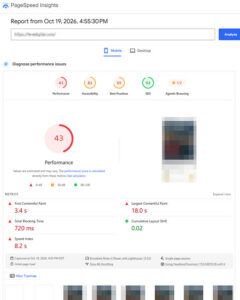 According to HTTP Archive data for 2025, only 48% of mobile websites manage to pass Core Web Vitals thresholds simultaneously. And while that is trending up from previous years, it still leaves a massive competitive advantage for sites built with clean, performance-first design foundations.
When you fix the frame of the house, you make more money. A mere 0.1-second improvement in mobile speed has been shown to increase retail conversions by 8.4%.
That performance is rooted in semantic HTML and code cleanliness. Proper heading tags (H1, H2, H3) create the logical hierarchy that crawlers rely on, whereas generic <div> tags offer no structural clues at all.
Google vs. Bing: The Crawler Constraints
Search engines evaluate your design by how efficiently they can crawl it.
Google and the pitfall of JavaScript: Heavy, poorly coded JavaScript that relies solely on client-side rendering can potentially create notable architectural friction. Instead of indexing your content immediately, Googlebot is forced to place your URL into a Web Rendering Service queue, a process known as “two-wave indexing”. Google has noted that they have worked hard to keep this time tight, but some studies still indicate it could vary in time from seconds to even days depending on the queue at the time. But if possible, just work to avoid the traffic jam altogether. If you want your dynamic design to rank, Server-Side Rendering (SSR) is a simple way to avoid the risks.
Bing’s Efficiency Rules: Bing is even more direct about their dislike of architectural bloat. Microsoft strongly encourages a “broad-to-specific” structure (the three-click rule). To bypass traditional crawl delays completely, Bing heavily advocates for the IndexNow protocol, an API that allows your website to explicitly notify the search engine the instant a URL is published or updated.
Designing for AI Answer Engines (AIO and GEO)
AI search experiences like Google’s AI Overviews and Microsoft Copilot do not merely retrieve and display hyperlinks; they read, summarize, and synthesize web content through a process called Retrieval-Augmented Generation (RAG) to ensure their answers are “grounded” in verifiable facts.
Here is the catch: when an AI agent crawls your page, it isn’t looking at your CSS animations. To process information quickly and conserve token usage, these bots strip away heavy style markup to get as close to clean, raw text (like Markdown) as possible. If your design relies on convoluted code to present your content, the AI simply skips it.
Furthermore, these engines don’t blindly trust the text they scrape. They cross-reference those “verifiable facts” against your broader brand footprint, checking social profiles, industry citations, and third-party reviews to confirm your authority.
Shameless self-plug: For a deeper dive on how that validation works, check out my article on shifting from SEO to GEO and optimizing for AI citations.
To be cited as a source by an AI, your design must facilitate rapid, unambiguous data extraction. Unfortunately, several popular modern design patterns actively defeat AI parsers:
- Accordions and Tabbed Content: Placing critical comparison tables or technical specifications inside expandable accordion menus often results in the AI parser reading only the button text while remaining entirely blind to the high-value data hidden within.
- PDFs for Core Data: Housing pricing tiers or corporate policies inside a PDF document strips away all the structural signals of HTML, making it difficult for an AI to confidently map the attributes.
- Data Encoded in Images: AI works most effectively with text-based delivery of data. Utilizing an infographic to display product specs without supplementary text means AI may not “look” for that info unless someone explicitly asks it to review the image file.
Teachable Moment: The Risks of Aesthetic Content Pruning Modern design trends heavily favor visual minimalism. However, removing long-form text or consolidating pages to achieve a “cleaner” aesthetic inadvertently strips the website of the semantic context and heading structures required for generative AI citations. You can modernize the typography, but be cautious not to prune too much of the raw semantic data from your site entirely.
The Redesign Risk: Protecting Your Pipeline
A website redesign isn’t just a cosmetic update; it is a major structural renovation for your brand. If you launch without a clear SEO-informed migration plan, you can easily break the pathways that drive your organic traffic and lose years of built-up backlink equity and authority. Not to mention causing potential issues with landing pages for other digital marketing channels like Paid, Social, and Email campaigns.
Two architectural failures happen during redesigns constantly:
- URL Restructuring: Changing a URL path without mapping the legacy URL to its closest equivalent using a 301 redirect results in a 404 error, breaking the connection to the backlinks you’ve earned over time.
- Staging Environment Errors: Development teams frequently push a staging environment to production but forget to remove the <meta name=”robots” content=”noindex”> tags, which effectively tells global search engines to drop the entire website from their indices. I see you shaking your head, but it happens more often than you might think.
The Right Reasons to Rebuild
All that said, a redesign is not something to avoid because it may be challenging, it is a highly effective tactic when the data indicates it’s time. If your analytics show that you are consistently failing Core Web Vitals, losing engagement on your key action pages, shedding mobile users due to poor responsiveness, or losing visibility because your underlying architecture can’t support modern structured data, a rebuild may be exactly what you need. It is your opportunity to clean up the code, accelerate your load speeds, and engineer an experience that actually converts.
Ultimately, web design is the literal interface between your brand’s offerings and the parsing algorithms of global search engines and AI agents. It isn’t just about looking good; it is about functioning flawlessly.
If you are planning a site redesign, or if your current site looks beautiful but refuses to pull its weight in organic revenue, scrap the guesswork. Reach out to the team at Hive Digital, and let’s make sure your website’s frame is as sturdy as its paint job is *purty.
*No, I didn’t mistype. It’s Southern slang for “pretty”.
Citation Sources: