TL;DR: Solving “Crawled – Currently Not Indexed”
The “Crawled – currently not indexed” status in Google Search Console indicates that while Google successfully accessed a URL, its indexing system chose not to include it in search results. This is rarely a technical bug; instead, it is a quality and value judgment. Google suppresses these pages when they lack sufficient differentiation from existing search results or fail to demonstrate clear topical authority.
Key Insights & Solutions:
- The Problem: Google views the content as redundant or “thin” compared to high-authority pages already in the index.
- The Primary Fix: Implement an Intent-Driven Page Title Formula: {Target Keyword} | {Specific Benefit/Goal} | {Brand Name}. This signals a unique value proposition to Googlebot.
- Quality Signals: Indexing is influenced by Topical Authority (depth of coverage in a niche) and PageRank (external links from trusted sites).
- Actionable Step: If a page remains stuck, differentiate the metadata to match specific user intent rather than using generic, high-competition keywords.
Why is Your URL in Crawled – Currently Not Indexed in GSC?
You’ve done the hard work. You’ve written the content, linked to related internal resources, optimized the images, and hit “publish.” But when you check Google Search Console, you’re met with the dreaded status: “Crawled – currently not indexed.”
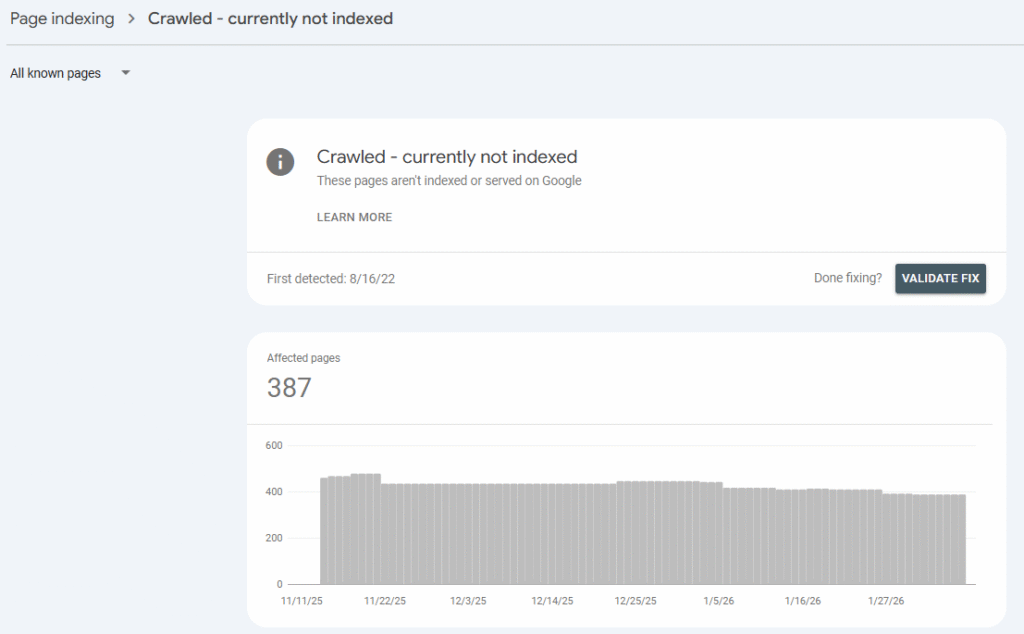
It feels like a snub. You might be digging through your robots.txt file, trying to find a mismatched canonical URL, or hunting for a rogue meta robots noindex tag, but here is the cold, hard truth: If a page is “Crawled,” it’s not a technical error. Google found the door, walked inside, looked around, and decided it wasn’t worth telling anyone else about.
This isn’t a bug; it’s a quality judgment.
Understanding the Value Barrier
Google’s resources are finite. Before the indexing system commits a URL to its permanent database, it asks: “Does this page add distinct value compared to the billions of pages we already have?”
If your page is sitting in this limbo, it usually means you’ve hit one of three walls:
- Low Topical Authority: Your site hasn’t yet proven it’s an expert in this specific niche.
- Lack of PageRank: You don’t have enough internal or external “votes” (links) signaling the page’s importance.
- The “Carbon Copy” Problem: Your page title and content look exactly like every other result already on Page 1.
Avoiding Thematic Duplicates
It is a common mistake to think duplication only refers to “copy-pasted” text. Google also filters for thematic duplication. This happens when you have two articles written with completely different words, but they target the exact same search intent. If Google is already ranking one of your pages for a specific keyword theme, it may refuse to index a second page that covers the same ground.
Hive Digital Pro Tip: Use GSC or Ahrefs to see if an existing page already “owns” the keywords you’re targeting. If it does, you don’t need a new page—you need to consolidate the two or realign the new page toward a unique, long-tail keyword focus.
How to Fix Crawled – Currently Not Indexed
One of the strongest levers you have to “prime” the indexer is the Page Title. A generic title suggests generic content. If your title is a carbon copy of a high-authority competitor, Google has zero incentive to index your version.
To break the stalemate, you need to signal unique value and searcher intent immediately. Use this formula to differentiate your URLs:
{Target Keyword} | {Benefit or Searcher Goal} | {Brand Name}
Real-World Examples: From Generic to Indexed
I’ve put together three new scenarios to show how this formula transforms “thin-looking” titles into high-value signals:
| Target Keyword | Generic Title (Likely to Fail) | Optimized Title (High Indexing Potential) |
| Best hiking boots | Best Hiking Boots | Best Hiking Boots | Lightweight Picks for Rugged Trails | Brand Name |
| CRM software | CRM Software for Small Business | CRM Software for SMBs | Automate Lead Tracking & Boost Sales | Brand Name |
| Vegan pasta recipes | Easy Vegan Pasta Recipes | Easy Vegan Pasta Recipes | 20-Minute Meals for Healthy Weeknights | Brand Name |
Why This Formula Influences Indexing
Why does a simple title change move the needle? It comes down to how Google perceives Differentiation and User Satisfaction.
- Signals Uniqueness: When the indexing algorithm sees a title that promises a specific angle (e.g., “for Wide Feet” or “15-Minute Meals”), it recognizes that the page provides a unique utility not found in the “generic” results.
- Increases CTR: A benefit-driven title isn’t just for bots; it’s for humans. Higher Click-Through Rates (CTR) tell Google that users find your result relevant, which reinforces its place in the index.
- Reduces “Pogo-sticking”: By matching the searcher’s specific goal in the title, you set expectations. When a user clicks and finds exactly what was promised, they stay on the page longer, a massive signal of topical authority.
How to Re-Submit for Indexing
Once you have updated your Page Title and ensured the content isn’t a thematic duplicate, you need to “nudge” Googlebot.
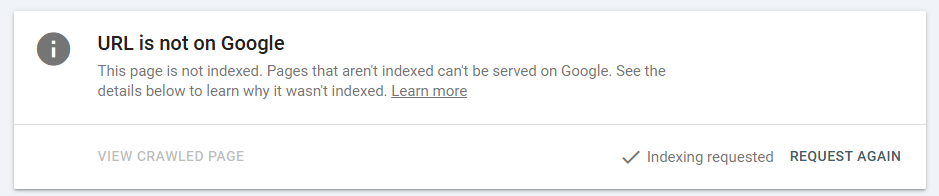
- Request Indexing: In GSC, paste your URL into the top search bar and click “Request Indexing.”
- Update the “Source”: Don’t just request the stuck page. Request indexing for the high-traffic pages that link to it. This forces Google to re-discover the “new” version of your page through natural crawling paths.
Other Causes for Crawled – Currently Not Indexed
While your page title is the most immediate lever to pull, Google also looks at these three factors to determine if your page deserves a spot in the index:
- External Links (PageRank): High-quality, thematically relevant backlinks from other sites act as a “vote of confidence.” They tell Google that other people value this content, which justifies the resources needed to index it.
- Topical Authority: Google prefers indexing content on sites that demonstrate a deep, consistent body of work in a specific niche. If you’re a “General” blog suddenly writing about “Quantum Computing,” you’ll likely see indexing delays.
- User Engagement Signals: Although indirect, signals like branded search queries (users searching for your brand name + a topic) and low “pogo-sticking” rates tell Google that your content actually satisfies the user’s intent once they arrive.
Ready to Clear the Indexing Logjam?
Fixing “Crawled – Currently Not Indexed” issues often requires more than just a title change, it requires a deep diagnostic look at your site’s authority, server performance, and thematic structure. Don’t let your best content gather dust in the “Crawled” graveyard while your competitors capture the traffic.
At Hive Digital, we specialize in moving the needle for complex SEO challenges. Whether you’re a small site struggling with topical authority or a large e-commerce platform facing massive crawl budget bottlenecks, our team can help you identify the “Why” behind Google’s exclusions and implement a recovery strategy that sticks.
Stop guessing and start indexing. Contact Hive Digital today for a consultation, and let’s turn your Search Console “Exclusions” into active organic growth.
Crawled – Currently Not Indexed FAQs
Q: Is “Crawled – currently not indexed” a penalty?
A: No. It is simply a “wait-and-see” status. Google knows the page exists and what is on it, but it hasn’t decided that the page is valuable enough to show to users yet. It’s an invitation to improve the page, not a slap on the wrist.
Q: What is the difference between “Crawled – currently not indexed” and “Discovered – currently not indexed”?
A: The difference is whether Google has actually visited the page. Discovered means Google knows the URL exists but hasn’t visited it yet. Crawled means Google has visited the page and read the content, but specifically chose not to include it in the search index
Q: Could it be a duplicate content issue?
A: Yes. If you have two pages that are 90% identical, Google will often index one and leave the other as “Crawled – currently not indexed.” Ensure your canonical tags are set correctly so Google knows which version is the “Master” copy.
Q: Does “thin content” cause this status?
A: Frequently. If a page has very few words, lacks original images, or provides no unique insight compared to what’s already on the web, Google may skip it to save space in the index.
Q: My page is buried 5 clicks deep; does that matter?
A: Absolutely. Site architecture plays a huge role. If a page is “orphaned” (has no internal links) or is hidden deep in your site structure, Google views it as unimportant. Try linking to your stuck pages from your high-traffic “power” pages.
Q: How long should I wait before making changes?
A: For a brand-new site, give Google 2–4 weeks. If you are an established site and a page hasn’t been indexed within 7 days of being crawled, it’s time to revisit your intent-driven page title and check for the quality issues mentioned above.